
Apple HomeView has moved from long-running rumour to a real Apple smart home product, giving users a dedicated screen for home controls, Siri AI, FaceTime, entertainment, and shared household information. For anyone already using apple mobile phones, HomePod, Apple TV, or apple homekit accessories, it could become the missing “always-on” control point that makes the Apple smart home feel less like a set of separate apps and more like one joined-up system.
What is Apple HomeView?
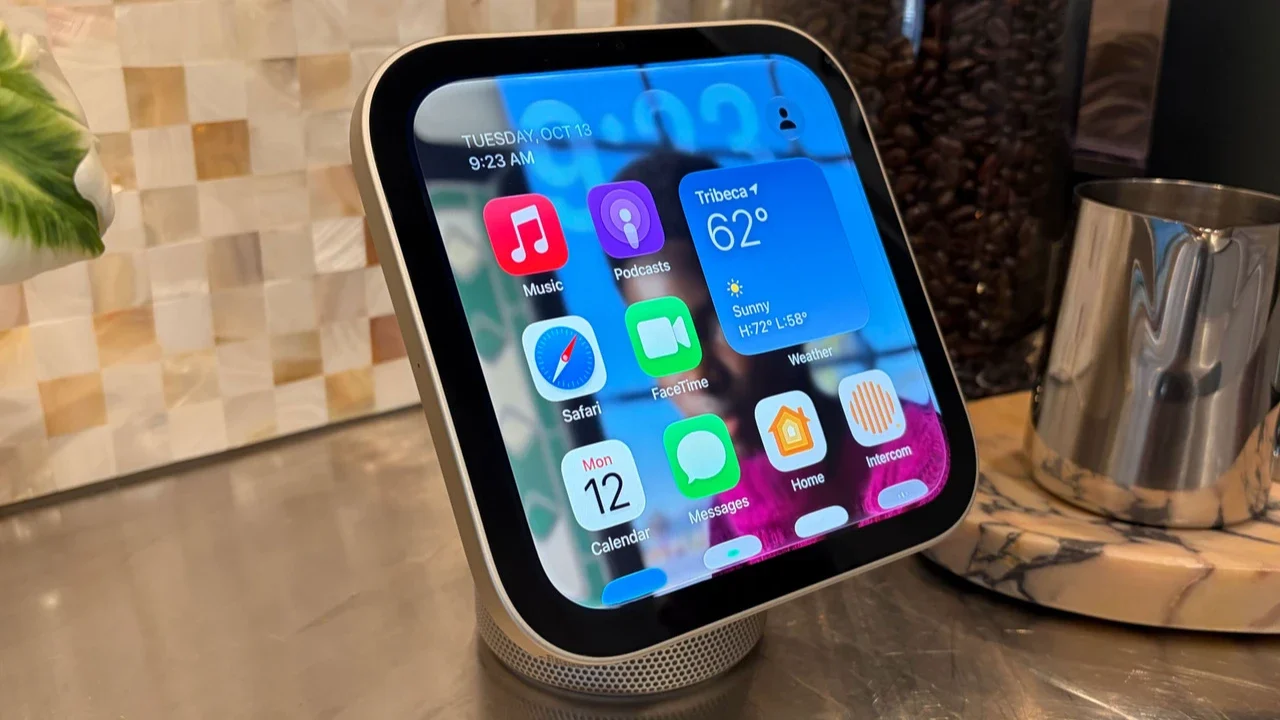
Apple HomeView is a smart home display designed to sit on a table or mount on a wall, combining a 7-inch Liquid Retina screen, speaker hardware, Siri AI, FaceTime, and Apple Home controls in one device. Apple announced it on October 13, 2026, with pre-orders open in several countries and availability beginning Friday, November 13, so the conversation has shifted from pure release rumours to how well the device may fit into real homes. (images.apple.com)
The simplest way to understand it is as a shared household hub rather than a replacement for an iPad. It is made for quick glances, voice commands, music, video calls, timers, camera feeds, and smart home scenes. That matters because most smart homes still rely on phones: useful, but personal, pocketed, and often locked. HomeView puts Apple’s home interface somewhere everyone can see and use.
The rumour trail has largely become confirmed detail
Before Apple’s announcement, reports pointed to a smart display focused on Siri, home controls, media, and communication. MacRumors, citing Bloomberg’s Mark Gurman, reported in September 2026 that Apple could unveil the device in October and that it was expected to act as a central interface for accessories, communication, media, and Apple services. (macrumors.com)
In the days before launch, the expected name, A18 chip, tabletop and wall-mounted versions, Siri AI support, four tabletop finishes, and a mid-November release window were all reported as leaks. Apple’s official announcement confirmed many of the broad ideas: a 7-inch display, Apple Intelligence with Siri AI, tabletop and wall-mounted models, personal recognition, smart home controls, and compatibility with Apple Home Collection, Works with Apple Home, and Matter accessories. (images.apple.com)
That does not mean every pre-launch rumour should be treated as equally reliable. Some early talk around the category imagined more futuristic hardware, including concepts like a moving display or robotic arm, but Apple’s first HomeView is a more practical screen-and-speaker hub. TechCrunch noted that Bloomberg had previously reported Apple could eventually take the idea further with a more advanced robotic-arm version, but that remains a future possibility rather than a current HomeView feature. (techcrunch.com)
Apple HomeView features that matter most
The headline apple homeview features are not just about the screen. The real pitch is that Apple wants one device to handle the small, frequent tasks that happen around the home: “turn off the lights,” “show the front door,” “start a timer,” “call Mum,” “play this playlist,” or “what’s next on my calendar?”
Key confirmed features include:
A 7-inch Liquid Retina display: Apple says the display supports True Tone and automatic brightness, dropping low enough for a nightstand while staying visible in brighter rooms. (images.apple.com)
Tabletop and wall-mounted designs: The tabletop model uses a domed speaker base and hinge, while the wall-mounted version is offered in silver and space gray and works with Schneider Home mounts. (images.apple.com)
Siri AI and Apple Intelligence: HomeView uses Siri AI for conversational requests, with deeper personal context when paired with a compatible Apple Intelligence-enabled iPhone or iPad. (images.apple.com)
Multi-user personalization: Apple says HomeView can recognize up to six users by face and show each person their own apps and widgets. (images.apple.com)
FaceTime, Messages, and Intercom: The device supports FaceTime with Center Stage, voice or keyboard replies in Messages, and Intercom announcements to rooms or devices. (images.apple.com)
Smart home dashboard: Users can control lights, thermostats, locks, blinds, and cameras by touch or voice through Siri AI. (images.apple.com)
Camera monitoring: The Home Camera face can livestream up to nine video feeds at once, and supported iCloud+ plans add recognition and HomeKit Secure Video features. (images.apple.com)
Entertainment and audio: HomeView supports Apple Music, Apple Podcasts, Apple TV, compatible third-party media apps, Handoff, Spatial Audio, and multiroom audio with HomePod, HomePod mini, and AirPlay speakers. (images.apple.com)
Taken together, the device looks less like a novelty screen and more like Apple’s attempt to make everyday home technology feel calmer. Instead of opening several apps on an iPhone, the household gets a visible, voice-first surface that can be used while cooking, leaving the house, answering the door, or getting ready for bed.
How could it change the Apple smart home?
HomeView could make the apple smart home more approachable by giving it a fixed centre. Apple Home and apple homekit have long worked well for people who enjoy setting up automations, scenes, and compatible devices, but the experience has often depended on individual iPhones, iPads, or voice-only HomePods. A dedicated display changes that by making controls visible, shared, and easier to discover.
For families or shared households, that visibility is important. A smart home should not require every person to remember the exact voice command or know where a setting lives in the Home app. If HomeView can show favourite accessories, camera feeds, timers, reminders, and shared information at a glance, it could reduce the “only one person knows how this works” problem.
It may also encourage more people to buy compatible accessories. Apple announced that HomeView works with Apple Home Collection, Works with Apple Home, and Matter accessories, with Apple Home Collection including cameras, thermostats, and a lock made in collaboration with LG Electronics and Schneider Electric. (images.apple.com) That broader compatibility is important because smart home adoption often stalls when users worry that products will not work together.
What does HomeView mean for iPhone users?
For iPhone users, HomeView appears designed to extend the phone rather than replace it. Apple says setup and multi-user support require a compatible iPhone or iPad running the latest software, and personal context features depend on a paired Apple Intelligence-enabled device with Siri AI enabled in a supported language. (images.apple.com)
That means the strongest experience will likely come to people already deep in Apple’s ecosystem. If your household uses Apple Music, FaceTime, Messages, Find My, Calendar, Reminders, Apple TV, HomePod, and apple mobile phones, HomeView has more information and services to draw from. If you use mixed platforms, it may still be useful as a smart home display, but some of its personal features may feel less complete.
Practical use cases for iPhone-heavy homes include:
Kitchen command centre: Follow recipes, run hands-free timers, play music, check calendar events, and control lights without touching your phone.
Front-door monitor: View camera feeds, check deliveries, and respond quickly when a compatible camera or door accessory detects activity.
Family information screen: Surface reminders, shared photos, music, messages, and Live Activities in a common space.
Nightstand assistant: Use low brightness, alarms, smart scenes, and voice control without reaching for an iPhone.
Whole-home audio control: Hand off audio from an iPhone and coordinate playback across HomeView, HomePod, HomePod mini, and AirPlay speakers.
This is where HomeView could become sticky. Apple does not need every user to treat it like a tablet. It only needs the device to be useful several times a day in moments when a phone is inconvenient.
Privacy is central to Apple’s pitch
Apple is positioning HomeView around shared use without shared exposure. According to Apple, HomeView and the A18 chip include Secure Exclaves for processing camera and microphone data separately from the rest of the system, and personal content in apps such as Messages and Calendar is surfaced only when the enrolled user is recognized and their paired iPhone or iPad is present and recently unlocked. (images.apple.com)
That distinction matters because smart displays live in kitchens, bedrooms, hallways, and living rooms. They are seen by children, guests, relatives, housemates, and visitors. A shared screen that reveals too much personal data would quickly become uncomfortable, so Apple’s challenge is to make HomeView feel personal without making it feel exposed.
Siri AI privacy will also be watched closely. Apple says Siri requests on HomeView can use on-device processing or Private Cloud Compute, and that when Private Cloud Compute is used, data is not stored or made accessible to Apple. (images.apple.com) Users who already trust Apple’s privacy approach may see that as a reason to choose HomeView over rival smart displays, while cautious buyers will still want to test how these protections work in everyday use.
Release date, price, colours, and availability
Apple says HomeView and HomeView Wall Mounted are available for pre-order at $299 in the U.S., with both models available beginning Friday, November 13, 2026, in countries including the U.S., UK, Canada, Australia, India, and New Zealand. The tabletop version comes in silver, starlight, rose pink, and space gray, while the wall-mounted version comes in silver and space gray. (images.apple.com)
There are a few limitations to note. Apple says Siri AI on HomeView is available in English in supported countries, while Canadian French support is planned for a later free software update. It also says HomeView is not available for sale in the European Union because Siri AI is currently unavailable in iOS in the EU. (images.apple.com)
Wall mounting may add cost. Apple says Schneider Home mounts include a USB-C Wall Connector and AC Wired option available at launch pricing, while a PoE Wired mount is planned for early 2027. (images.apple.com) Smart home accessories are also sold separately, so the real cost depends on how much of your home you want to connect.
Who should consider Apple HomeView first?
HomeView makes the most sense for people who already use Apple services and want a more visible smart home interface. If you have HomeKit or Matter accessories, iCloud+, HomePod speakers, Apple TV, and multiple iPhones in the household, the device could pull those pieces into a more convenient daily routine.
It may be less urgent for users who only need a voice speaker, rarely use smart home accessories, or prefer controlling everything from a phone. It is also worth waiting for reviews if your main interest is sound quality, camera performance, app support, or how well Siri AI handles messy household requests.
A quick buying checklist:
You already use Apple Home or apple homekit devices.
Your household relies on iPhone, FaceTime, Messages, Calendar, Apple Music, or Find My.
You want a shared screen for cameras, timers, lights, locks, and scenes.
You are comfortable with a first-generation product.
You have a clear place for it: kitchen counter, entryway, living room, bedroom, or wall mount.
You understand that some features require compatible devices, iCloud+, subscriptions, or supported regions.
The bigger takeaway for Apple users
Apple HomeView is important because it gives Apple’s smart home strategy a physical centre. HomeKit, HomePod, Apple TV, and the Home app have always been useful, but they often felt like parts of a system rather than a single household experience. HomeView could change that by making the smart home visible, shared, and easier to use in the places where people actually live.
The device will not be for everyone, and first-generation products always come with questions. Still, if Apple’s Siri AI works reliably and the smart home dashboard feels fast, HomeView could become one of the most meaningful Apple home products in years. For Apple users who want their lights, locks, cameras, entertainment, and family communication to feel more connected, it is one to watch closely.